Everything You Need to Manage Your Network
Comprehensive automation platform built for modern network operations
Switch Upgrade Automation
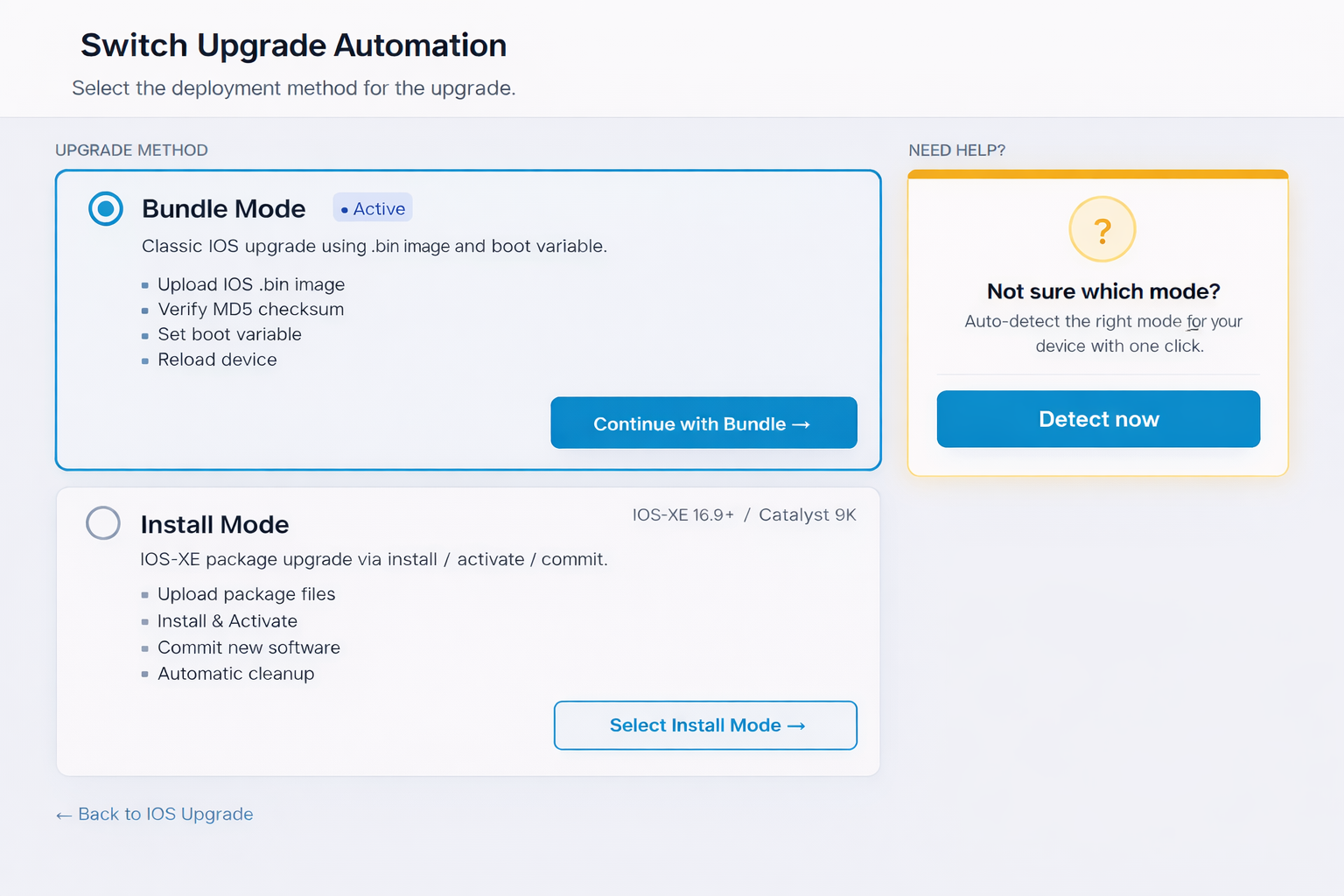
Comprehensive IOS upgrade workflows supporting both traditional Bundle Mode and modern Install Mode deployment methods.
Bundle Mode Workflow
- Flash Capacity Check: Automatically verify available storage across all flash partitions and stack members
- IOS Upload: Model-based image selection with MD5 verification and progress monitoring
- Boot Variable Configuration: Automated boot system updates with verification
- Scheduled Reboot: Plan device reloads during maintenance windows
- Post-Upgrade Cleanup: Remove old images to free space for future updates
Install Mode Workflow
- Package Upload: Intelligent package deployment with automatic model detection
- Activation & Commit: Safe activation with optional pause-before-commit
- Remove Inactive Packages: Automated cleanup of old package files
- Pre/Post Verification: Baseline capture and comparison for confident validation
Smart Flash Cleanup
Automatic detection and safe removal of unused images. Running image always protected from deletion.
Stack-Aware
Detects stack configurations and checks all flash locations across every member (flash1:, flash2:, etc.).
Batch Operations
Single-device or bulk operations via file upload. Schedule for maintenance windows or execute immediately.
WLAN Management Suite
Complete lifecycle management for Cisco wireless access points with intelligent automation and diagnostics
Operations Center
- AP reload and power cycle
- Factory reset with confirmation
- LED location toggle
- Uptime monitoring
- Configuration snapshots
- Config compare and export
AP Replacement Wizard
- 5-step guided process
- Source AP selection or config upload
- QR code scanning for target AP
- Automated config transfer
- RF settings configuration
- Verification checklist & report generation
Troubleshooting Tools
- Client connection diagnostics
- RF environment scanner
- Interface status checker
- Log retrieval and filtering
- Command runner with templates
- Detailed diagnostic reports
Batch Configuration Deployment
Push configurations to multiple access points simultaneously using predefined templates or custom commands. Templates include high-density environments, interference mitigation, and power-save modes.
Workflow Automation Engine
Build, schedule, and execute custom network automation workflows. Reduce repetitive tasks and ensure consistency across your infrastructure.
Automation Features
-
Pre-Built Templates: Device provisioning, security audits, configuration backups, and performance monitoring workflows ready to use
-
Custom Workflow Builder: Create multi-step automation sequences with conditional logic and error handling
-
Flexible Scheduling: Run workflows once, daily, weekly, monthly, or on custom schedules
-
Job History & Retries: Complete execution history with automatic retry logic for transient failures
Reporting & Intelligence
Built-in reporting tools across your entire infrastructure
AP Inventory
Comprehensive reports with filtering by site, model, and status. Export to Excel, CSV, or PDF.
Network Topology
Auto-generated topology maps from CDP/LLDP discovery. Interactive visualization with interface names, link speeds, and device details. Always accurate, no Visio needed.
PSIRT Advisories
Track security advisories applicable to your network. Monitor remediation and maintain compliance.
IPAM & Planning
Visual subnet management, IP tracking, VLAN mapping, and network planning calculators.
Security & Compliance
Enterprise-grade security controls and comprehensive audit logging for compliance and operational excellence
Role-Based Access Control
- Admin and User role separation
- Granular permission management
- User lifecycle management (create, edit, activate/deactivate)
- Session management and timeout controls
- Multi-factor authentication (TOTP)
Complete Audit Logging
- Every action tracked with timestamp, user, and IP
- Searchable and filterable activity logs
- Per-user activity summaries
- Export logs for compliance reporting
Secure Connectivity
- Jump server integration
- SSH key and TACACS support
- Secure password hashing
- Session encryption
Compliance Ready
- PSIRT advisory tracking
- Remediation status dashboard
- Complete change audit trail
- Pre/post verification reports
Out-of-Band Remote Recovery
Console-level access to remote devices over cellular connectivity. Recover from failed upgrades, ROMMON states, and boot failures without driving to site.
How It Works
-
Compact OOB Gateway: Pre-deployed at each remote site, connected to the switch console port via USB-to-serial adapter
-
LTE/5G Cellular Uplink: Independent connectivity path that works even when your entire network is down
-
WireGuard VPN Tunnel: Encrypted connection back to your management network. No serial ports exposed to the internet.
-
Browser-Based Console: Open a terminal session directly from the NetGUI dashboard. Full console access at 9600 baud, 8N1.
-
Health Monitoring: Continuous signal strength, VPN tunnel status, and connectivity checks with automatic alerts
Recovery Scenarios
Every scenario where you'd normally need to drive to site
Failed Upgrades
Switch stuck in ROMMON after a bad IOS upgrade. Boot from console and restore the previous image.
Boot Failures
Corrupted boot variable or missing image. Fix BOOT variable and reload from console.
Password Recovery
Locked out of a device with no SSH access. Perform password recovery via console without a site visit.
Pre-Boot Diagnostics
Check hardware diagnostics, flash contents, and environment variables before the device fully boots.
Troubleshooting Workbench
Diagnose any switch from one screen instead of SSH-hopping across the fleet. The diagnostic tools do not change device configuration, so first-line staff can investigate safely.
Key Capabilities
-
Reachability Tests: Run ping and traceroute from the platform to any device and read the results without opening a terminal
-
TDR Cable Test: Trigger a cable diagnostic on a port and read the distance to a fault in meters, before anyone climbs a ladder
-
Interface Checker: Errors, drops, speed and duplex for any port, parsed into a readable summary instead of raw CLI output
-
Find MAC & ARP Lookup: Enter a MAC or IP address and see which switch and port the device sits on, with trunks and uplinks filtered out
-
Port X-Ray: One scan collects interface, STP and log data for a port and returns severity-ranked findings with an overall grade
Switchboard
Bring up a new switch by mirroring one you already trust. Switchboard reads the uplink and a reference configuration, generates the config for the new device, and validates it before anything is applied.
-
Uplink-Aware: Reads the upstream switchport, VLANs and EtherChannel members so the new switch fits the network it is joining
-
Safety Checks Built In: Generated configurations are validated and unsafe commands are rejected before anything reaches a device
Health Check Engine
A curated command set runs against a switch, the output is parsed into structured results, and every run is stored with history and notes.
-
Per-Switch Baselines: Save a known-good state and compare any later run against it with a readable diff
-
Run History: Labelled runs with engineer notes, so before-and-after evidence for any change is one click away
Auto-Generated Network Topology
Always-accurate topology maps built from real CDP/LLDP data. No more outdated Visio diagrams that nobody maintains.
Key Capabilities
-
Automatic Discovery: Reads CDP and LLDP neighbor tables from every device to build the complete topology automatically
-
Interactive Visualization: Click any device for details, hover over links to see interface names, speeds, and VLANs
-
Always Current: Topology updates automatically on every scan. New devices, changed links, and removed connections are detected instantly
-
Change Alerts: Get notified when new links appear, devices go missing, or the topology changes unexpectedly
-
Export & Share: Export topology maps to PDF, PNG, or share a live link with your team. Perfect for documentation and change management
Why Auto-Discovery Beats Manual Diagrams
Your Visio diagrams are outdated the moment someone changes a cable
The Problem with Visio
Manual diagrams go stale within weeks. Someone adds a switch, moves a cable, replaces a stack member. Nobody updates the drawing.
Always Up to Date
NetGUI reads CDP/LLDP data directly from your devices. The topology reflects what's actually connected, not what someone remembered to draw.
Share with Your Team
Export to PDF or PNG for documentation. Share live links so everyone sees the same topology. Perfect for change management and audits.
See NetGUI in Action
Schedule a personalized demo with our team and discover how NetGUI can transform your network operations.
Request Demo